
Boards.com
Boards.comBusiness
4.6557.00 Reviews
- Version
- 3.9.6
- Installs
- 1.00M
- Age Rating
- Everyone
Screenshots



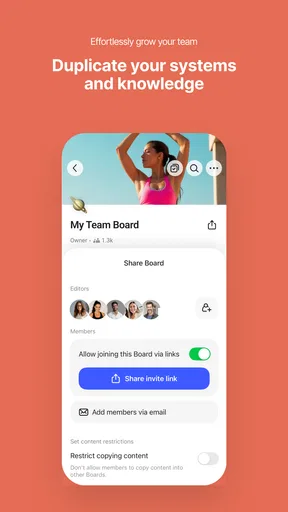

Our Review of Boards.com
 Analysis by Appyee
I like task tools best when they help me decide what to do next without turning setup into a project of its own. Boards.com is aimed at that kind of practical organization: it gives work and personal plans a shared board-and-list format, with room to coordinate tasks and keep related material together. I’d consider it when a scattered mix of notes and reminders is becoming hard to follow, but I wouldn’t treat it as a substitute for every specialist business system.
A useful starting routine
My first recommendation is to begin with one real workflow rather than building a board for every area of life. For example, a small team could make a board for an upcoming launch, then use separate lists for work that has not started, is underway, and is ready for review. That structure makes the board useful immediately: a quick glance shows where attention is needed, and people can discuss an individual task in its comments instead of burying decisions in a long chat thread.
For a personal plan, the same idea works on a smaller scale. I might keep a trip board with lists for bookings, things to pack, and errands to finish before leaving. The practical benefit is not simply that everything is digital; it is that each item has a clear home. If a board starts collecting unrelated ideas, I’d split those into a separate space rather than make one crowded board responsible for everything.
Boards.com is a free business app from Boards.com, and its straightforward board format is approachable for people who do not want to learn a complicated project-management method first. It has a 4.5 average from around 17,000 ratings, with over a million installs. Those figures suggest that it has found a broad audience, but they are not a guarantee that its approach will suit every team. I’d judge it by whether its boards match the way you already talk about work.
First Impressions: A Clean Slate
When you first open Boards.com, you’re greeted with a crisp, intuitive interface that’s as refreshing as a cool breeze on a hot day. The app is designed to be incredibly user-friendly, so you don’t have to be a tech wizard to navigate it. I found myself zipping through the setup process and creating my first board in no time. It’s like they’ve taken the best bits of a whiteboard and digitized them, but with way more functionality.
Customization Galore
One of the standout features of Boards.com is its customizability. You can tailor boards to suit your exact needs, whether you're managing a team project or planning a personal getaway. I love how I can add different types of lists, color-code them, and even insert attachments. It’s like having a Swiss Army knife for task management.
There’s also a nifty feature that lets you set deadlines and reminders. As someone who’s prone to procrastination, this has been a lifesaver. No more missed deadlines or last-minute scrambles for me!
Settings that shape the day
Before inviting a whole group, I’d check how the board is organized and whether its labels and colors mean the same thing to everyone. Color is useful as a quick visual cue, but it should not carry information that teammates cannot interpret. A short naming convention—such as using a consistent color for urgent work—can make scanning easier; if the board is shared with people who may not know the convention, write the meaning into the task or list name too.
I’d also make a deliberate choice about reminders. They are helpful when a due date represents a genuine commitment, but too many alerts can train people to ignore them. For a team board, it is worth agreeing which updates need attention and which can wait until the next check-in. That habit makes notifications more useful without asking everyone to monitor the board constantly.
The app is free to get started, while in-app purchases range from $5.99 to $239.90 per item. I’d look at the purchase details in the app before building a workflow around anything that may require payment, especially if several people need access to the same work. The free starting point is appealing for trying the board approach, but a business should confirm that the features and costs it needs fit its own plans before standardizing on it.
Collaboration Made Easy
If you’re working with a team, Boards.com shines brightly. The app allows you to invite team members to your boards, making collaboration seamless. Everyone stays on the same page, and you can even leave comments directly on tasks. It’s like having a mini-conference right there on your phone or tablet. I’ve found it super helpful for keeping everyone in the loop and on track.
What’s more, the notification system is non-intrusive yet effective. You’ll get gentle nudges when there are updates, but it won’t feel like your phone is buzzing every five seconds. Trust me, your sanity will thank you.
Faster patterns for recurring work
For repeatable tasks, I’d resist making a fresh board from scratch each time. A small, stable set of lists can serve as a working pattern: keep the stages recognizable, then add only the tasks that change for the current project. This reduces setup effort and makes it easier for returning collaborators to understand the board. It is a simple discipline rather than a hidden shortcut, but that is often the difference between a useful workspace and one that needs constant explanation.
A second habit is to write task titles as the next visible action, not as a broad topic. “Confirm the venue” is easier to act on than “event planning,” and a comment can hold the context or discussion that does not belong in the title. Attachments can keep supporting material near the work, but I would still give files a clear name and explain why they matter in the task. That small bit of context saves teammates from opening several documents just to find the relevant one.
On an ordinary workday, I can imagine checking a shared board on the way in, noticing that a task has moved and a comment asks for a decision, then replying in the task rather than searching through messages later. At the end of the day, a quick pass through the lists can show what is still blocked and what needs to be picked up tomorrow. This works particularly well for small projects where the group benefits from one visible place to coordinate, without needing a formal project office.
Sync Across Devices
One of my favorite aspects of Boards.com is its ability to sync across multiple devices. Whether I’m on my phone during a commute or at my desktop in the office, my boards are always up to date. This feature is especially handy for those of us who are always on the go. It’s like having your entire workspace in your pocket.
The syncing is smooth and fast, so you won’t have to deal with any awkward delays or missing information. It’s this kind of reliability that really sets Boards.com apart from the competition.
Where the board approach has limits
Boards are strongest when the work can be divided into visible tasks and a handful of understandable stages. If your team mainly needs to assign ownership, track dependencies across a complicated schedule, produce detailed reports, or follow a strict approval process, a dedicated project-management platform may be a better fit. A flexible board can show progress, but flexibility also means the team has to agree on how it will use the space. Without that agreement, people may create duplicate lists, use colors differently, or leave tasks in an unclear state.
It is also worth separating coordination from record-keeping. A board can help people see what needs doing and keep relevant attachments close, but sensitive or formally controlled business records may belong in a system designed for that purpose. I would avoid putting important information into a task merely because it is convenient, and I would check the organization’s own rules before using any shared workspace for confidential material.
For someone who wants a personal checklist and nothing more, this may feel like more structure than necessary. A notes app or the built-in reminders tool on a phone can be quicker for one-off errands. At the other end, teams that already depend on a specialized system may not gain much by duplicating the same work on another board. The best case for this app is the middle ground: people who need a visual shared plan, but do not want every small project to require a heavyweight process.
Integration with Other Apps
Boards.com doesn’t just stop at task management. It integrates beautifully with a range of other apps and services. Whether you’re using Google Drive, Dropbox, or even Slack, you can connect them directly to your boards. Personally, I love being able to pull in documents and files without having to switch apps. It’s a real time-saver and keeps everything in one neat package.
When choosing whether to connect another service, I’d start with the friction it actually removes. If a team regularly needs a document while discussing a task, keeping that material close to the board can reduce back-and-forth. If the connection adds another place to check without improving the handoff, it may be better to keep the workflow simple. Integrations are most valuable when they support a repeatable action, not just because a connection is available.
Practical fit and getting started carefully
The app is rated for Everyone, and its current version is 3.4.2, with Android support from version 9. I’d still check that a particular device and operating system are compatible before asking a whole team to move its routine into the app. It was released on August 19, 2020, and its steady presence in the business category makes it a familiar sort of tool: a shared visual space for organizing work rather than a specialist system for one industry.
To test whether it suits you, I’d use one small, low-risk project first. Invite only the people who will actually update the board, agree on what each list means, and put a real deadline on a task so you can see whether reminders help. After a few days, ask whether people can tell what to do next without needing an explanation. If not, simplify the board before adding more labels or lists. This trial reveals more than creating a polished but unused workspace.
Some readers will want to know whether they can use it across phone and desktop, and the cross-device syncing is one of its useful strengths. Others will wonder whether collaboration requires a complicated process; the board-and-comment setup is approachable, though it still depends on teammates keeping tasks current. If your main question is cost, the app is free to download, with optional in-app purchases, so review the relevant purchase options before committing to a paid workflow.
Final Thoughts: Is It Worth It?
After spending some time with Boards.com, I can confidently say it’s a game-changer for anyone looking to streamline their projects and tasks. The combination of customization, collaboration, and integration makes it a powerhouse app for productivity.
If you’re tired of juggling multiple apps or drowning in sticky notes, give Boards.com a shot. It’s like having a personal assistant right at your fingertips, making life a little less chaotic and a whole lot more organized. Plus, the peace of mind it brings is absolutely priceless.
So, if you’re ready to take control of your projects and tasks, why not check out Boards.com? It might just be the tool you’ve been looking for all along.
My verdict after putting it in context
I’d recommend it to a small team that needs a clear shared view of everyday work, or to an individual who likes organizing plans visually and wants comments, reminders, and attachments alongside tasks. I would not recommend switching an entire company to it before testing how its board structure handles the team’s real processes. The deciding question is whether the work becomes easier to see and act on, not whether the board can be made to hold everything.
My most useful rule is to keep each board focused, make list names understandable at a glance, and use comments for discussion tied to a specific task. That gives the app room to be flexible without letting the workspace turn into a pile of unrelated information. Used with that kind of restraint, it can be a sensible, approachable way to bring scattered project details into view; if your work needs deep planning controls or formal record management, I’d choose a more specialized alternative instead.
Verdict
Strengths of Boards.com
- Intuitive user interface for easy navigation.
- Wide range of customizable templates.
- Real-time collaboration features.
- Accessible on both iOS and Android.
- Cloud sync ensures data is always up-to-date.
Limitations of Boards.com
- Limited offline functionality.
- Premium features require a subscription.
- Occasional sync delays reported.
- In-app ads can be intrusive.
- Some templates are not beginner-friendly.
Similar Picks in This Category
View All
LinkedIn: Community & Network
LinkedIn3.8

Zoom Workplace
zoom.com4.1

Microsoft Teams
Microsoft Corporation4.6

Meta Business Suite
Meta Platforms, Inc.4.6

Webex Meetings
Cisco Systems, Inc.4.5

TeamViewer Remote Control
TeamViewer4.4
Frequently Asked Questions
What is Boards.com and how does it work?
Boards.com is a collaborative project management app designed to streamline team communication and task management. Users can create boards, add tasks, assign responsibilities, set deadlines, and track progress in real-time. The app integrates with various tools like Google Drive and Slack to enhance productivity and ensure seamless workflow.
Is Boards.com available on both Android and iOS?
Yes, Boards.com is available on both Android and iOS platforms, making it accessible for users across different devices. You can download the app from the Google Play Store for Android devices and the App Store for iOS devices. The app ensures a consistent experience regardless of the operating system.
Does Boards.com offer a free version, and what are the limitations?
Boards.com offers a free version with basic features suitable for small teams or individual projects. However, the free version limits the number of boards and integrations you can use. For more advanced features, such as unlimited boards and premium integrations, users need to subscribe to a paid plan.
Can I use Boards.com offline?
Boards.com requires an internet connection to sync your tasks and collaborate with your team in real-time. While you can view previously loaded data offline, any changes or updates will only sync once you reconnect to the internet. This ensures all team members have the latest information.
How secure is my data on Boards.com?
Boards.com prioritizes user data security by implementing robust encryption protocols to protect your information. The app regularly updates its security measures in line with industry standards to safeguard against unauthorized access. Additionally, users can manage access permissions for team members, ensuring data is only available to those who need it.
